Comcast Equipment List:
Standard Equipment –
- (1) Primary Access Modem: Broadband Connectivity
- (2) Meraki MX67C-HW-NA: Firewalls in HA
- (1) Meraki MS120-24-HW: Switch
- (1) Meraki MS120-24P-HW: POE Switch
- (2) Meraki MR20-HW: Indoor APs
- (1) WB-250-IPW: Wattbox Power Management
- (2) Panorama Antenna: Ultra-Wideband MiMo Antenna
Optional Equipment –
- (1) Cradlepoint AER1650 4G Modem: Temporary primary broadband (if needed)
- (1-2) Meraki MR70: Cloud Managed Outdoor AP
- (1) Meraki MS120-24-HW: Additional 24-Port Non-PoE Switch
- (2) Meraki MS120-48-HW: Additional 48-port Non-PoE Switch
- (1) 5u or 9u Cabinet: Equipment Cabinet for Managed Devices.
Network Diagram
Standard Deployment
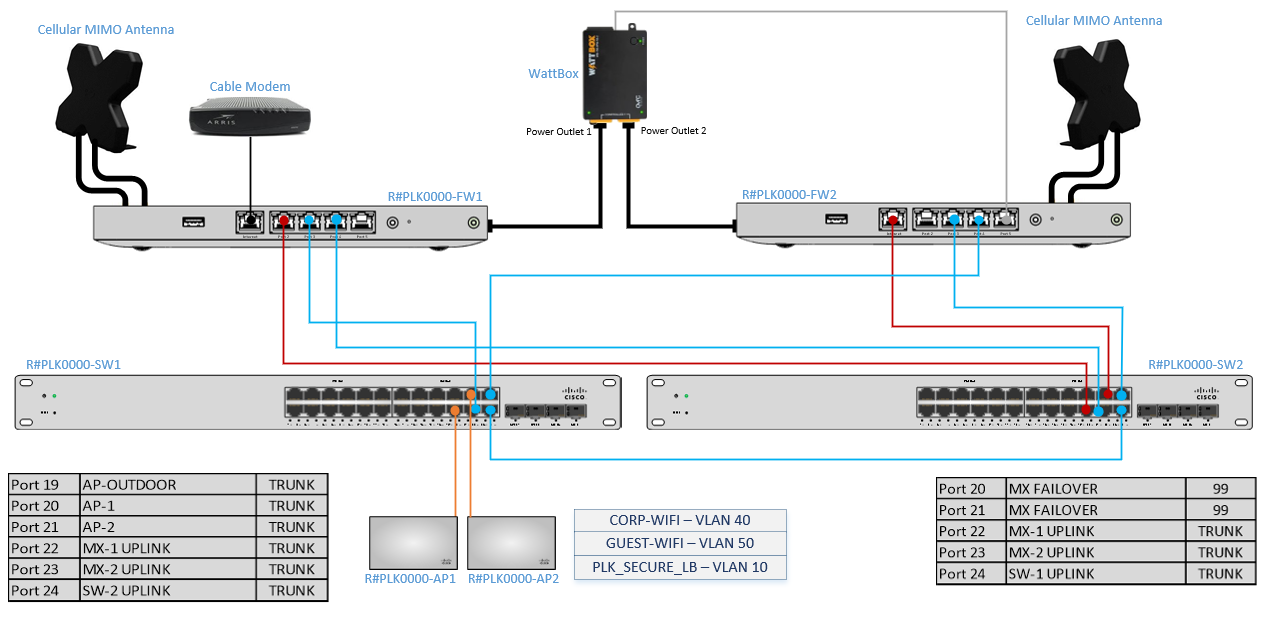
Standard Network Diagram with 48 Port Switch
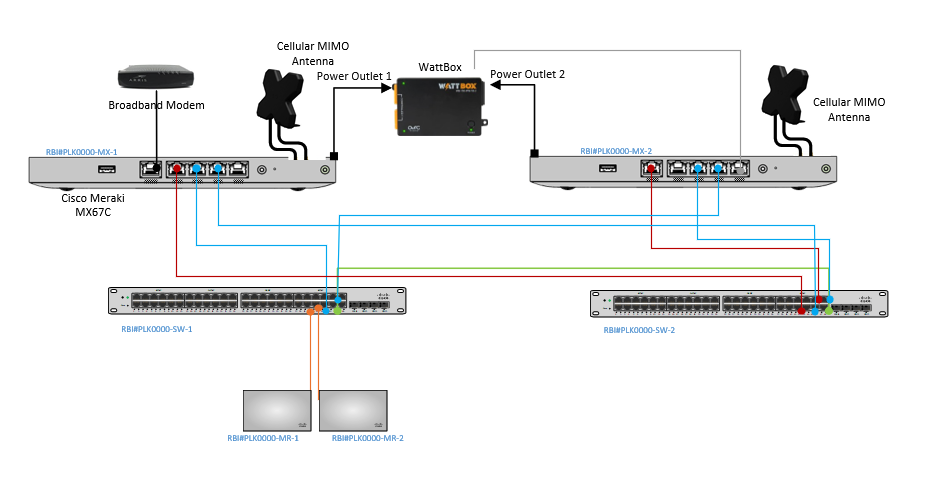
Standard + Optional 24-Port Switch
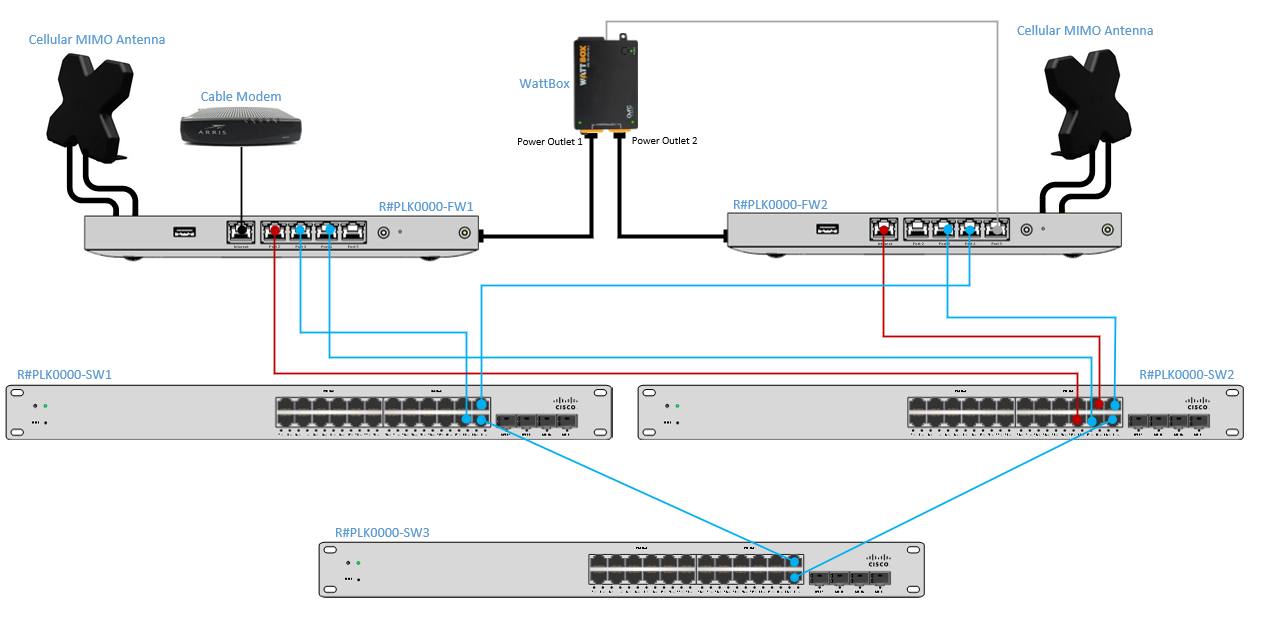
Network Layout
|
VLAN |
VLAN NAME |
SUBNET |
DHCP? |
PURPOSE |
|
10 |
POS-NCR |
192.168.16.0/24 |
Yes |
Secure CDE Environment for PCI activities. |
|
POS-XENIAL |
192.168.1.0/24 |
No |
||
|
20 |
DMB |
192.168.170.0/24 |
Yes |
Digital Menu Boards, DTD, etc |
|
30 |
FRANCHISE-DMZ |
192.168.3.0/24 |
Yes |
Store devices requiring Internet access |
|
40 |
CORP-WIFI |
192.168.4.0/24 |
Yes |
Store wifi for employees and managers |
|
50 |
GUEST-WIFI |
192.168.5.0/24 |
Yes |
Wifi for customers |
|
70 |
KIOSK |
192.168.7.0/24 |
Yes |
Lobby Ordering Kiosks |
|
90 |
DVR |
192.168.9.0/24 |
Yes |
Dedicated for DVR/Camera systems |
|
99 |
FAILOVER |
192.168.99.0/24 |
Yes |
Dashboard connectivity for FW2 utilizing the broadband connection of FW1. |
|
254 |
MANAGEMENT |
192.168.254.0/24 |
Yes |
Comcast device management for Meraki gear and Wattbox. |
Managed Device Naming Conventions
|
Device: |
Correct Convention: |
|
Meraki MX67C (Firewall) |
R#PLK00000-FW1 R#PLK00000-FW2 |
|
Meraki MS120-24P (POE Switch) |
R#PLK00000-SW1 |
|
Meraki MS120-24 (Switch) |
R#PLK00000-SW2 |
|
Meraki MR20 AP (Indoor Access Point) |
R#PLK00000-AP1 R#PLK00000-AP2 |
|
Meraki MR70 AP (Outdoor Access Point) |
R#PLK00000-AP3 |
|
WattBox |
R#PLK00000-WB1 |
WIFI/SSIDs List
|
VLAN |
Authentication |
Pre-Shared Key |
Shaping |
|
|
Popeyes Internal |
40 |
WPA2 w/ PSK |
RedBlue2020! |
N/A |
|
Popeyes Guest |
50 |
Splash Page (30m timeout) |
N/A |
20Mbps per SSID |
|
PLK_SECURE_LB |
10 |
Hidden with WPA2 PSK |
k2usMX6jup$ne293 |
Priority |
Important: PLK_SECURE_LB WIFI network is hidden. DHCP is not enabled, and static IP addressing is required for any device to connect.
SwitchPort Mapping
*DMB switches should be plugged into port 11 on each switch.
|
R#PLK00000-SW1 |
|
R#PLK00000-SW2 |
||||
|
Port |
Description |
VLAN |
|
Port |
Description |
VLAN |
|
Port 1 |
POS-BACKOFFICE (NCR) or POS-TERM0 (Xenial) |
10 |
|
Port 1 |
POS |
10 |
|
Port 2 |
POS |
10 |
|
Port 2 |
POS |
10 |
|
Port 3 |
POS |
10 |
|
Port 3 |
POS |
10 |
|
Port 4 |
POS |
10 |
|
Port 4 |
POS |
10 |
|
Port 5 |
POS |
10 |
|
Port 5 |
POS |
10 |
|
Port 6 |
POS |
10 |
|
Port 6 |
POS |
10 |
|
Port 7 |
POS |
10 |
|
Port 7 |
POS |
10 |
|
Port 8 |
POS |
10 |
|
Port 8 |
POS |
10 |
|
Port 9 |
POS |
10 |
|
Port 9 |
POS |
10 |
|
Port 10 |
POS |
10 |
|
Port 10 |
POS |
10 |
|
Port 11 |
IDMB-SWITCH |
20 |
|
Port 11 |
ODMB-SWITCH |
20 |
|
Port 12 |
DMB |
20 |
|
Port 12 |
DMB |
20 |
|
Port 13 |
DMB |
20 |
|
Port 13 |
DMB |
20 |
|
Port 14 |
DMB |
20 |
|
Port 14 |
DMB |
20 |
|
Port 15 |
DMB |
20 |
|
Port 15 |
DMB |
20 |
|
Port 16 |
DMB |
20 |
|
Port 16 |
DMB |
20 |
|
Port 17 |
DMZ-MGR-PC |
30 |
|
Port 17 |
FRANCHISE-DMZ |
30 |
|
Port 18 |
FRANCHISE-DMZ |
30 |
|
Port 18 |
FRANCHISE-DMZ |
30 |
|
Port 19 |
AP-OUTDOOR |
TRUNK |
|
Port 19 |
DVR |
90 |
|
Port 20 |
AP-1 |
TRUNK |
|
Port 20 |
MX FAILOVER |
99 |
|
Port 21 |
AP-2 |
TRUNK |
|
Port 21 |
MX FAILOVER |
99 |
|
Port 22 |
MX-1 UPLINK |
TRUNK |
|
Port 22 |
MX-1 UPLINK |
TRUNK |
|
Port 23 |
MX-2 UPLINK |
TRUNK |
|
Port 23 |
MX-2 UPLINK |
TRUNK |
|
Port 24 |
SW-2 UPLINK |
TRUNK |
|
Port 24 |
SW-2 UPLINK |
TRUNK |
48 Port Switch Layout
|
SW-1 |
|
SW-2 |
||||
|
Port |
Description |
VLAN |
|
Port |
Description |
VLAN |
|
Port 1 |
POS |
10 |
|
Port 1 |
POS |
10 |
|
Port 2 |
POS |
10 |
|
Port 2 |
POS |
10 |
|
Port 3 |
POS |
10 |
|
Port 3 |
POS |
10 |
|
Port 4 |
POS |
10 |
|
Port 4 |
POS |
10 |
|
Port 5 |
POS |
10 |
|
Port 5 |
POS |
10 |
|
Port 6 |
POS |
10 |
|
Port 6 |
POS |
10 |
|
Port 7 |
POS |
10 |
|
Port 7 |
POS |
10 |
|
Port 8 |
POS |
10 |
|
Port 8 |
POS |
10 |
|
Port 9 |
POS |
10 |
|
Port 9 |
POS |
10 |
|
Port 10 |
POS |
10 |
|
Port 10 |
POS |
10 |
|
Port 11 |
POS |
10 |
|
Port 11 |
POS |
10 |
|
Port 12 |
POS |
10 |
|
Port 12 |
POS |
10 |
|
Port 13 |
POS |
10 |
|
Port 13 |
POS |
10 |
|
Port 14 |
POS |
10 |
|
Port 14 |
POS |
10 |
|
Port 15 |
POS |
10 |
|
Port 15 |
POS |
10 |
|
Port 16 |
POS |
10 |
|
Port 16 |
POS |
10 |
|
Port 17 |
POS |
10 |
|
Port 17 |
POS |
10 |
|
Port 18 |
POS |
10 |
|
Port 18 |
POS |
10 |
|
Port 19 |
POS |
10 |
|
Port 19 |
POS |
10 |
|
Port 20 |
POS |
10 |
|
Port 20 |
POS |
10 |
|
Port 21 |
POS |
10 |
|
Port 21 |
DMB |
20 |
|
Port 22 |
POS |
10 |
|
Port 22 |
DMB |
20 |
|
Port 23 |
POS |
10 |
|
Port 23 |
DMB |
20 |
|
Port 24 |
IDMB-SWITCH |
20 |
|
Port 24 |
ODMB-SWITCH |
20 |
|
Port 26 |
DMB |
20 |
|
Port 26 |
DMB |
20 |
|
Port 27 |
DMB |
20 |
|
Port 27 |
DMB |
20 |
|
Port 28 |
DMB |
20 |
|
Port 28 |
DMB |
20 |
|
Port 29 |
DMB |
20 |
|
Port 29 |
DMB |
20 |
|
Port 30 |
DMB |
20 |
|
Port 30 |
DMB |
20 |
|
Port 31 |
DMB |
20 |
|
Port 31 |
DMB |
20 |
|
Port 32 |
DMB |
20 |
|
Port 32 |
DMB |
20 |
|
Port 33 |
DMB |
20 |
|
Port 33 |
DMB |
20 |
|
Port 34 |
DMZ-MGR-PC |
30 |
|
Port 34 |
DMZ-MGR-PC |
30 |
|
Port 35 |
DMZ-MGR-PC |
30 |
|
Port 35 |
DMZ-MGR-PC |
30 |
|
Port 36 |
DMZ-MGR-PC |
30 |
|
Port 36 |
DMZ-MGR-PC |
30 |
|
Port 37 |
DMZ-MGR-PC |
30 |
|
Port 37 |
DMZ-MGR-PC |
30 |
|
Port 38 |
DMZ-MGR-PC |
30 |
|
Port 38 |
DMZ-MGR-PC |
30 |
|
Port 39 |
DMZ-MGR-PC |
30 |
|
Port 39 |
DMZ-MGR-PC |
30 |
|
Port 40 |
DVR |
90 |
|
Port 40 |
DVR |
90 |
|
Port 41 |
MXFAILOVER |
99 |
|
Port 41 |
DMZ-MGR-PC |
30 |
|
Port 42 |
MXFAILOVER |
99 |
|
Port 42 |
DMZ-MGR-PC |
30 |
|
Port 43 |
AP-OUTDOOR |
TRUNK |
|
Port 43 |
DMZ-MGR-PC |
30 |
|
Port 44 |
AP-1 |
TRUNK |
|
Port 44 |
MX FAILOVER |
99 |
|
Port 45 |
AP-2 |
TRUNK |
|
Port 45 |
MX FAILOVER |
99 |
|
Port 46 |
MX-1 UPLINK |
TRUNK |
|
Port 46 |
MX-1 UPLINK |
TRUNK |
|
Port 47 |
MX-2 UPLINK |
TRUNK |
|
Port 47 |
MX-2 UPLINK |
TRUNK |
|
Port 48 |
SW-2 UPLINK |
TRUNK |
|
Port 48 |
SW-2 UPLINK |
TRUNK |
Switch Port Mapping For optional 3rd Switch
Important: If a site has Kiosk, they will be using the switch profile on the right labeled Kiosk
Optional 24 Port Switch Kiosk 24 Port Switch
|
R#PLK00000-SW3 |
|
R#PLK00000-SW3 |
||||
|
Port |
Description |
VLAN |
|
Port |
Description |
VLAN |
|
Port 1 |
POS |
10 |
|
Port 1 |
POS |
10 |
|
Port 2 |
POS |
10 |
|
Port 2 |
POS |
10 |
|
Port 3 |
POS |
10 |
|
Port 3 |
POS |
10 |
|
Port 4 |
POS |
10 |
|
Port 4 |
POS |
10 |
|
Port 5 |
POS |
10 |
|
Port 5 |
POS |
10 |
|
Port 6 |
POS |
10 |
|
Port 6 |
POS |
10 |
|
Port 7 |
POS |
10 |
|
Port 7 |
POS |
10 |
|
Port 8 |
POS |
10 |
|
Port 8 |
POS |
10 |
|
Port 9 |
POS |
10 |
|
Port 9 |
ORB-Kiosk |
70 |
|
Port 10 |
POS |
10 |
|
Port 10 |
Kiosk |
70 |
|
Port 11 |
POS |
10 |
|
Port 11 |
Kiosk |
70 |
|
Port 12 |
POS |
10 |
|
Port 12 |
Kiosk |
70 |
|
Port 13 |
DMB |
20 |
|
Port 13 |
Kiosk |
70 |
|
Port 14 |
DMB |
20 |
|
Port 14 |
Kiosk |
70 |
|
Port 15 |
DMB |
20 |
|
Port 15 |
Kiosk |
70 |
|
Port 16 |
DMB |
20 |
|
Port 16 |
Kiosk |
70 |
|
Port 17 |
DMB |
20 |
|
Port 17 |
Kiosk |
70 |
|
Port 18 |
DMB |
20 |
|
Port 18 |
DMB |
20 |
|
Port 19 |
DMB |
20 |
|
Port 19 |
DMB |
20 |
|
Port 20 |
FRANCHISE-DMZ |
30 |
|
Port 20 |
FRANCHISE-DMZ |
30 |
|
Port 21 |
FRANCHISE-DMZ |
30 |
|
Port 21 |
FRANCHISE-DMZ |
30 |
|
Port 22 |
FRANCHISE-DMZ |
30 |
|
Port 22 |
FRANCHISE-DMZ |
30 |
|
Port 23 |
SW1-Port 24 UPLINK |
TRUNK |
|
Port 23 |
SW1-Port 24 UPLINK |
TRUNK |
|
Port 24 |
SW2-Port 24 UPLINK |
TRUNK |
|
Port 24 |
SW2-Port 24 UPLINK |
TRUNK |
Device Connectivity
|
DEVICE |
VENDOR |
VLAN |
SW1 |
SW2 |
|
POS Back-Office |
NCR, rPOS |
POS: VL10 |
Port 1 |
N/A |
|
POS Back-Office Printer |
NCR, rPOS |
POS: VL10 |
Ports 1-10 |
Ports 1-10 |
|
POS Terminal 0 |
Xenial |
POS: VL10 |
Ports 1-10 |
Ports 1-10 |
|
POS Terminals |
NCR, Xenial |
POS: VL10 |
Ports 1-10 |
Ports 1-10 |
|
POS Pinpads |
Verifone |
POS: VL10 |
Ports 1-10 |
Ports 1-10 |
|
POS/Expo Printers |
Xenial, (NCR Printers have serial connections) |
POS: VL10 |
Ports 1-10 |
Ports 1-10 |
|
Order Ready Screen |
Xenial, Stratacache |
POS: VL10 |
Ports 1-10 |
Ports 1-10 |
|
KDS/Expo Screens |
Xenial |
POS: VL10 |
Ports 1-10 |
Ports 1-10 |
|
Drive Thru Director (DTD) |
Xenial |
DMB: VL20 |
Ports 11-16 |
Ports 11-16 |
|
HME Drive Thru Timer |
HME |
DMB: VL20 |
Ports 11-16 |
Ports 11-16 |
|
IDMB Players |
Xenial, Stratacache |
DMB: VL20 |
Ports 11-16 |
Ports 11-16 |
|
IDMB Screens |
LG, Samsung |
DMB: VL20 |
Ports 11-16 |
Ports 11-16 |
|
ODMB Players |
Xenial, Stratacache |
DMB: VL20 |
Ports 11-16 |
Ports 11-16 |
|
ODMB Screens |
LG, Samsung |
DMB: VL20 |
Ports 11-16 |
Ports 11-16 |
|
Order Confirmation Unit (OCU) |
Xenial, Stratacache |
DMB: VL20 |
Ports 11-16 |
Ports 11-16 |
|
Chicken Chatta |
SageNet |
FRANCHISE-DMZ: VL30 |
Ports 17-18 |
Ports 17-18 |
|
Managers PC |
Various |
FRANCHISE-DMZ: VL30 |
Ports 17-18 |
Ports 17-18 |
|
Smart Safe |
Various |
FRANCHISE-DMZ: VL30 |
Ports 17-18 |
Ports 17-18 |
|
Music/Media Players |
Various |
FRANCHISE-DMZ: VL30 |
Ports 17-18 |
Ports 17-18 |
|
Security Systems |
Various |
FRANCHISE-DMZ: VL30 |
Ports 17-18 |
Ports 17-18 |
|
Phone - VOIP/ATA |
Various |
FRANCHISE-DMZ: VL30 |
Ports 17-18 |
Ports 17-18 |
|
DVR |
Various |
DVR: VL90 |
N/A |
Port 19 |
|
|
|
|
|
|
DVR Considerations
- DVR will be moved to separate network and will need to be reconfigured with the below IP address information for functionality.
- IP Address: 192.168.9.10
- Subnet Mask: 255.255.255.0
- Default-Gateway: 192.168.9.1
- Primary DNS: 8.8.8.8
- Secondary DNS: 8.8.4.4